
Grouping Products For Amazon PPC Ads
In addition to selecting the right products, it is also important to group the right products together in ad groups and campaigns. Grouping them right has some key implications, as follows:
- Product Category: Products from a specific or similar categories can go in one campaign. These campaigns in turn would be replicated into Automatic, Manual Product and Keyword targeting campaigns.
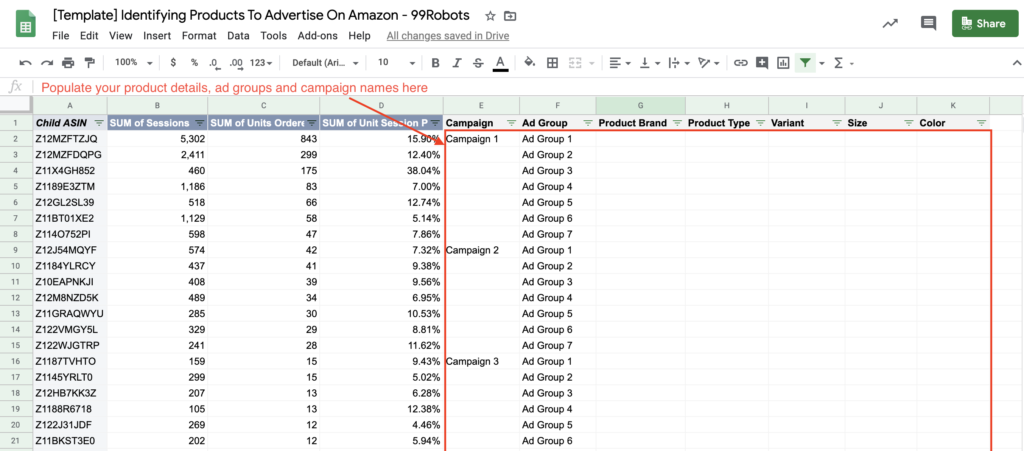
- Product Types and Attributes: Products of different types and attributes should be grouped in different ad groups. The goal here is to ensure products in an ad group are closely identical to each other so they could target a same set of keyword or product targets.
- Bid: Your bidding strategy would be simplified if the products with similar margins were grouped together in ad groups and campaigns
- Budget: You would be able to easily define and manage budgets efficiently on specific set of products under a campaign
- Profit Margins: Your profit margins may be different across products, grouping the ones with level of profit margins will be easier to manage bids and budgets.
- ACoS: Depending on your profit margins, your ACoS targets may be different across products. Therefore, grouping them on them on the basis of ACoS targets will make it easier to manage bids, budgets and performance as well.
Product Grouping Template
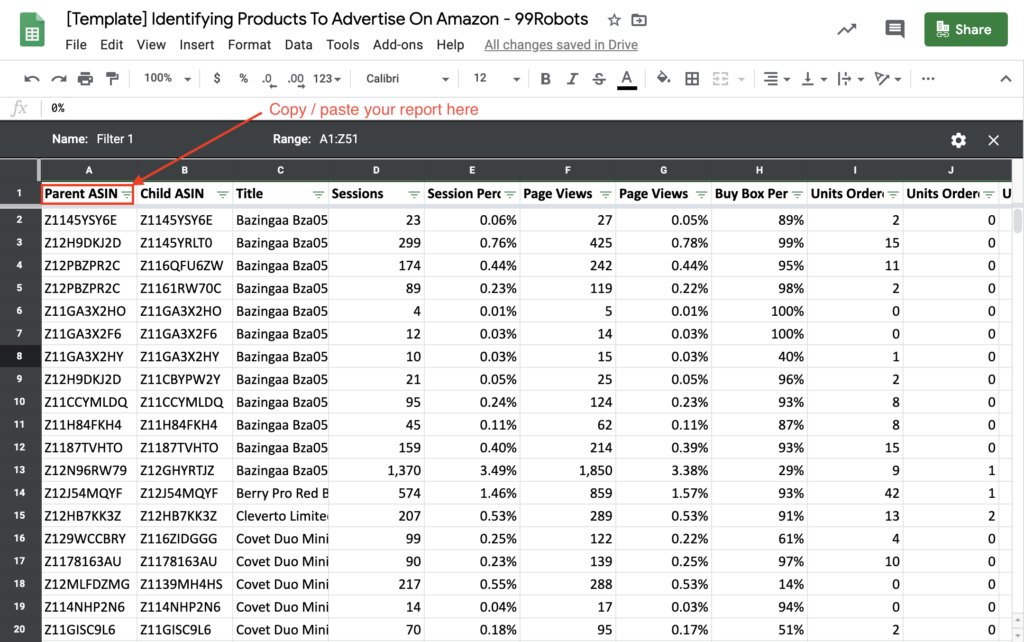
We have prepared a template to help you group products, based on their sales conversion, product types and attributes. In order to use this template, you would need to download your “Detail Page Sales and Traffic” report in a CSV or Excel sheet format. Here are steps again:
- Login to your Seller Central and then go to Business Reports section
- Go to “Detail Page Sales and Traffic” report under “By ASIN” section
Next, make a copy of of this Google Sheet report, to save a copy for yourself and copy/paste your downloaded report from the csv or excel sheet into the cell (in the first tab named as “All Products”), as indicated in the screenshot below:
Once you have copied your report, go to the next tab named as “Product Analysis and Grouping” tab, to populate your product attributes, campaigns, and ad groups. Here is a screenshot:
Additional Product Grouping Considerations
- Best Selling Products: Your best selling products are more likely to sell more when promoted. Therefore, you may want to select the best products and promote them in a campaign/ad group together.
- Products with High Ratings and Reviews: Promoting products with high ratings and reviews is another automatic choice. It would be a good strategy to select these products with high ratings and reviews but lower sales and run them in a separate campaign/ad groups.
- Low Selling Products: Grouping the low selling products together may align well with your advertising strategy to increase sales.
- Surplus or Low Inventory Products: Products with surplus inventory, if grouped together in a campaign, you could go aggressive with bids and budgets and move more of these products.
- High and Low Margin Products: Grouping products with high and low margins in separate ad groups and campaigns make it easier for your to bid aggressively or moderately.
- Similar Products: Grouping similar products together (color, size, shape, quantity etc) in ad groups and campaigns will make it easier to use targeting methods as well as bids and budgets.
- Product Accessories: Grouping product accessories together in a campaign will be helpful in using the targeting method and placements, ideally during product details and checkout pages where they have already added the main products.
- Product Category: Grouping products from the same category will make category targeting easier as well as it may align with your business strategy of leading the category and pushing competitors out.